Teaching a language model to look things up before answering, instead
of guessing from memory.
Prerequisites: Basic understanding of what a
language model (LLM) does. Familiarity with the idea of a database.
The Problem
Imagine you have a 200-page report about climate change. You need a
quick answer: “What does chapter 2 say about the main cause of climate
change?” So you ask a language model.
The model gives you a generic, textbook-style answer about greenhouse
gases. It sounds reasonable. But it is not drawn from your report. The
model has never seen your document. It is answering from memory, from
patterns learned during training. It might even state facts that sound
right but are nowhere in your source material. This is called
hallucination, and it is one of the biggest risks of
using language models for knowledge work.
Now scale this up. Your company has thousands of internal documents:
policy manuals, research papers, product specs, legal contracts.
Employees ask questions about these every day. A language model that
answers from memory alone is useless here. It does not know what is in
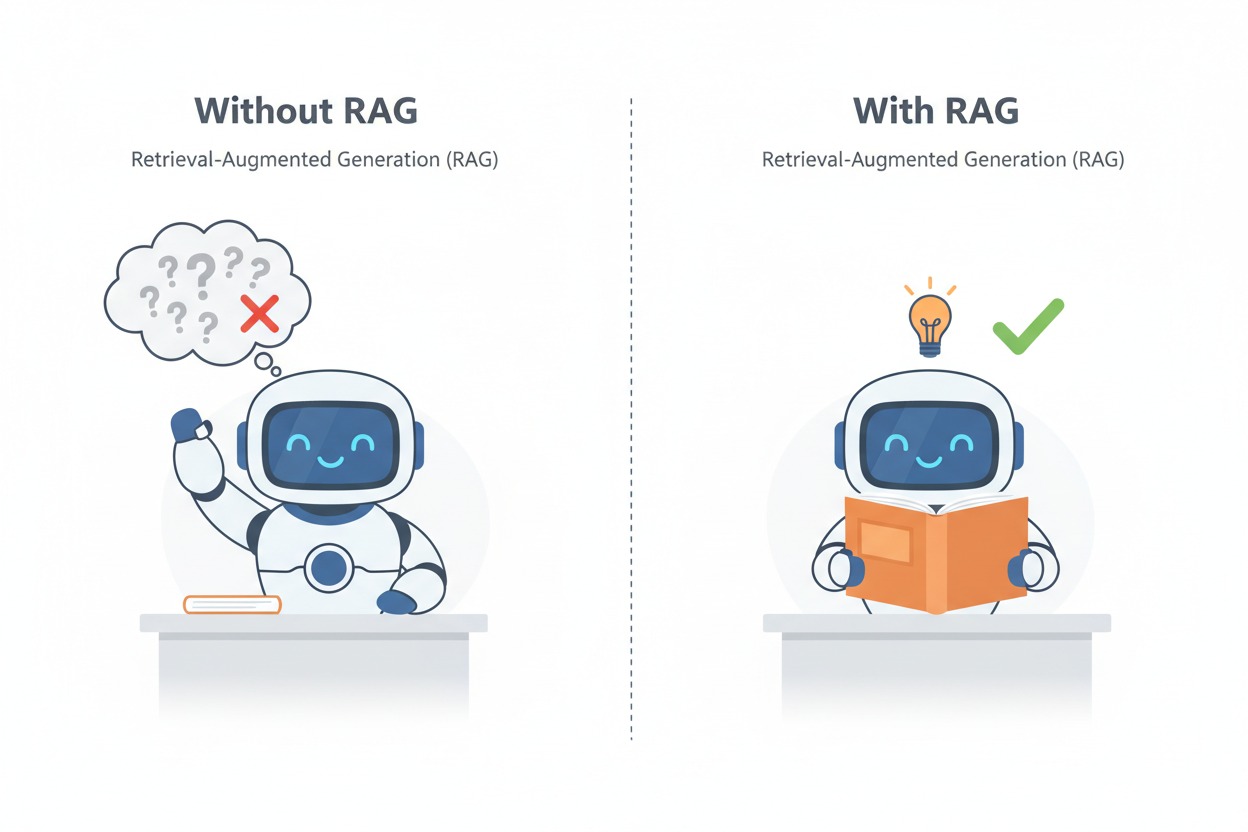
your documents. The contrast is stark: without access to your documents,
the model guesses and often gets it wrong. With access, it reads the
relevant passage and answers correctly. The following illustration
captures this difference.
Without RAG, a robot answers from memory
and gets it wrong. With RAG, the same robot reads the source document
and answers correctly.
The Core Idea
RAG, short for Retrieval-Augmented Generation,
solves this by adding a simple step: before the model answers, it first
searches your documents for relevant information.
Think of it as the difference between a closed-book exam and an
open-book exam. In a closed-book exam, the student relies entirely on
memory, staring at the blank page with growing uncertainty. In an
open-book exam, the student can look up the relevant section, read it,
and write an informed answer with confidence. RAG gives your language
model an open book.
A closed-book student struggles with a
question mark overhead, while an open-book student writes confidently
with a reference book on their desk and a lightbulb above.
The core insight: you do not need to retrain the model or stuff
entire documents into the prompt. You store your documents in a
searchable format, retrieve only the relevant pieces, and hand those
pieces to the model as context.
The model does what it does best: read the context and generate a
clear, grounded answer. The rest of this chapter explains exactly how
this works, step by step.
How It Works
The simple RAG pipeline has two phases: an offline
preparation phase (done once per document) and an
online query phase (done each time a user asks a
question).
Phase 1: Preparing the
Knowledge Base
Step 1: Load the Document
The process starts by extracting raw text from your source documents.
A PDF is parsed page by page, converting visual content into plain text.
This is a straightforward conversion step, but it matters. Poor text
extraction leads to poor retrieval downstream.
Think of this as a librarian transcribing a book onto index cards so
it can be cataloged and searched.
Step 2: Split Into Chunks
A 200-page document is far too large to search as a single block. The
system splits the text into smaller pieces called
chunks. A common default is chunks of about 1,000
characters (roughly a long paragraph), with 200 characters of overlap
between consecutive chunks.
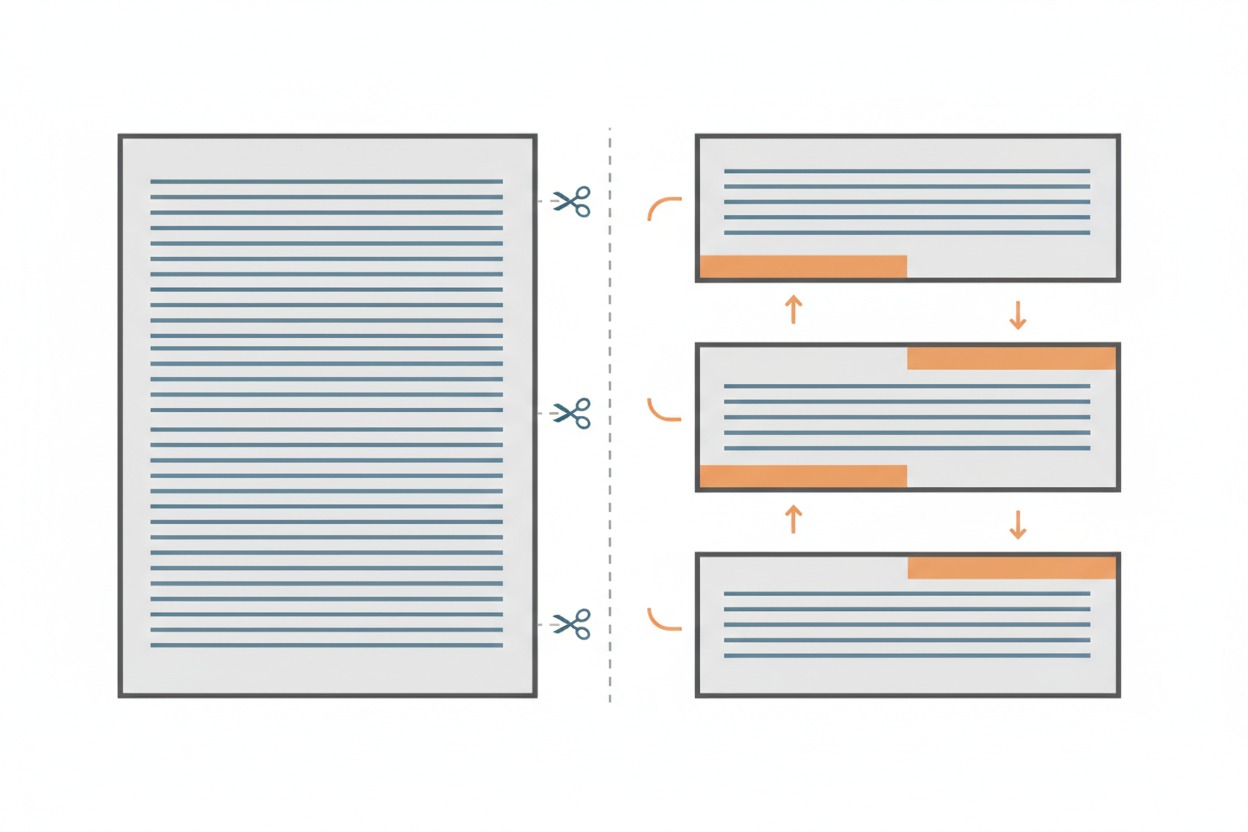
Why overlap? Imagine a critical explanation that spans two
paragraphs. If you split the text exactly between them, neither chunk
captures the full thought. The overlap ensures that information at the
boundaries is preserved. Each chunk carries the last few lines of the
previous chunk and the first few lines of the next one, so no thought is
lost at the seams. The diagram below shows this: notice how the
orange-highlighted bands at the bottom of one chunk match the top of the
next, representing the shared overlap region.
A full document on the left is split into
three separate chunks on the right, with orange bands showing the
overlap regions shared between consecutive chunks.
Step 3: Clean the Text
Raw text extracted from PDFs often carries formatting artifacts:
stray tab characters, extra whitespace, broken line endings. A cleaning
step normalizes the text so that the next stages work reliably. This is
a small but important detail. Dirty text leads to noisy embeddings.
Step 4: Create Embeddings
This is the most important transformation in the pipeline. Each text
chunk is converted into an embedding: a list of numbers
(a vector) that captures the meaning of the text. These are not random
numbers. They are carefully computed so that two chunks about similar
topics produce vectors that are close together in mathematical space,
while chunks about different topics produce vectors that are far
apart.
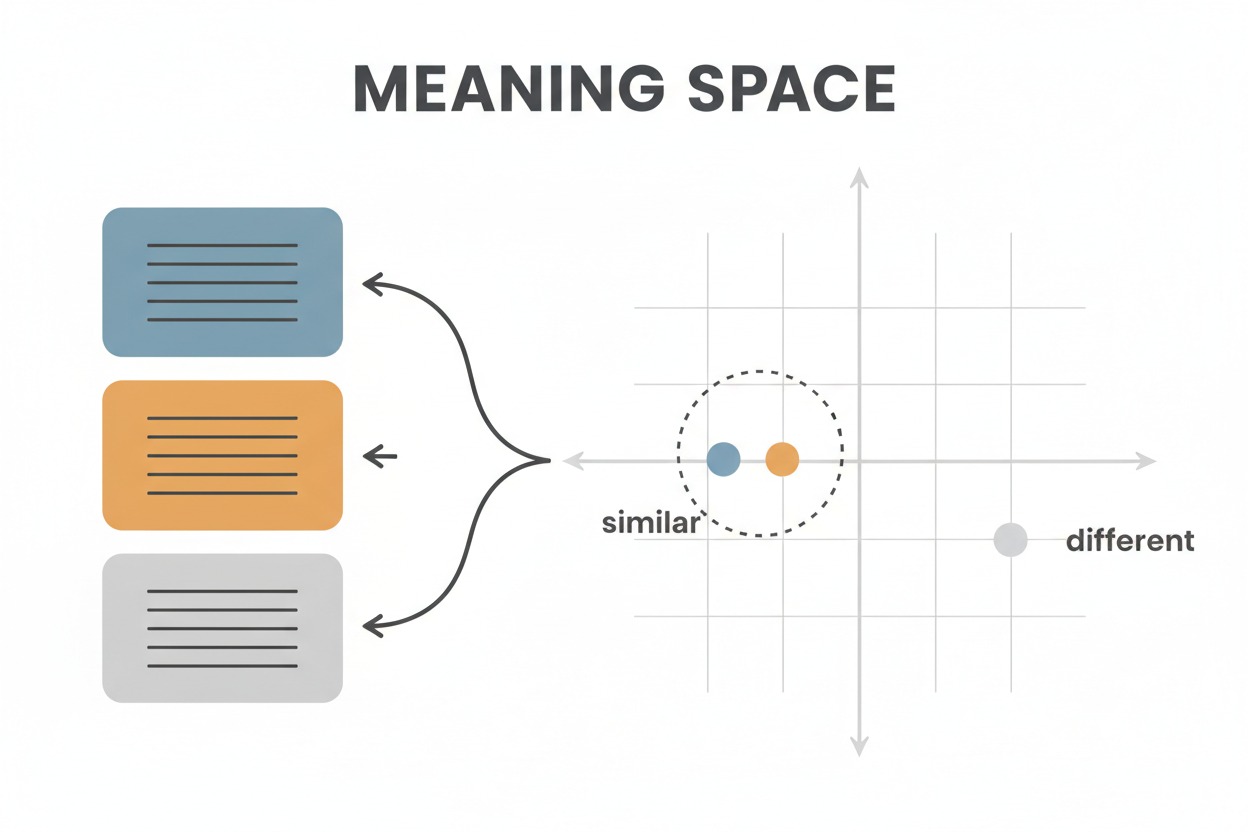
Think of embeddings as GPS coordinates for meaning. Just as GPS
coordinates let you find places that are geographically close, embedding
vectors let you find text passages that are semantically close. A chunk
about “greenhouse gas emissions” and a chunk about “carbon dioxide in
the atmosphere” will have nearby vectors, even though they use different
words. The illustration below shows this: the blue and orange text cards
map to dots that cluster together (labeled “similar”) because they cover
related topics, while the gray card maps to a distant dot (labeled
“different”).
Three text cards in blue, orange, and
gray are mapped into a coordinate grid labeled “Meaning Space.” The blue
and orange dots cluster together labeled “similar,” while the gray dot
sits apart labeled “different.”
Step 5: Store in a Vector Database
All embedding vectors are stored in a specialized database optimized
for similarity search. A popular choice is FAISS (Facebook AI Similarity
Search), which organizes vectors so that finding the nearest neighbors
to any query vector is extremely fast, even with millions of
entries.
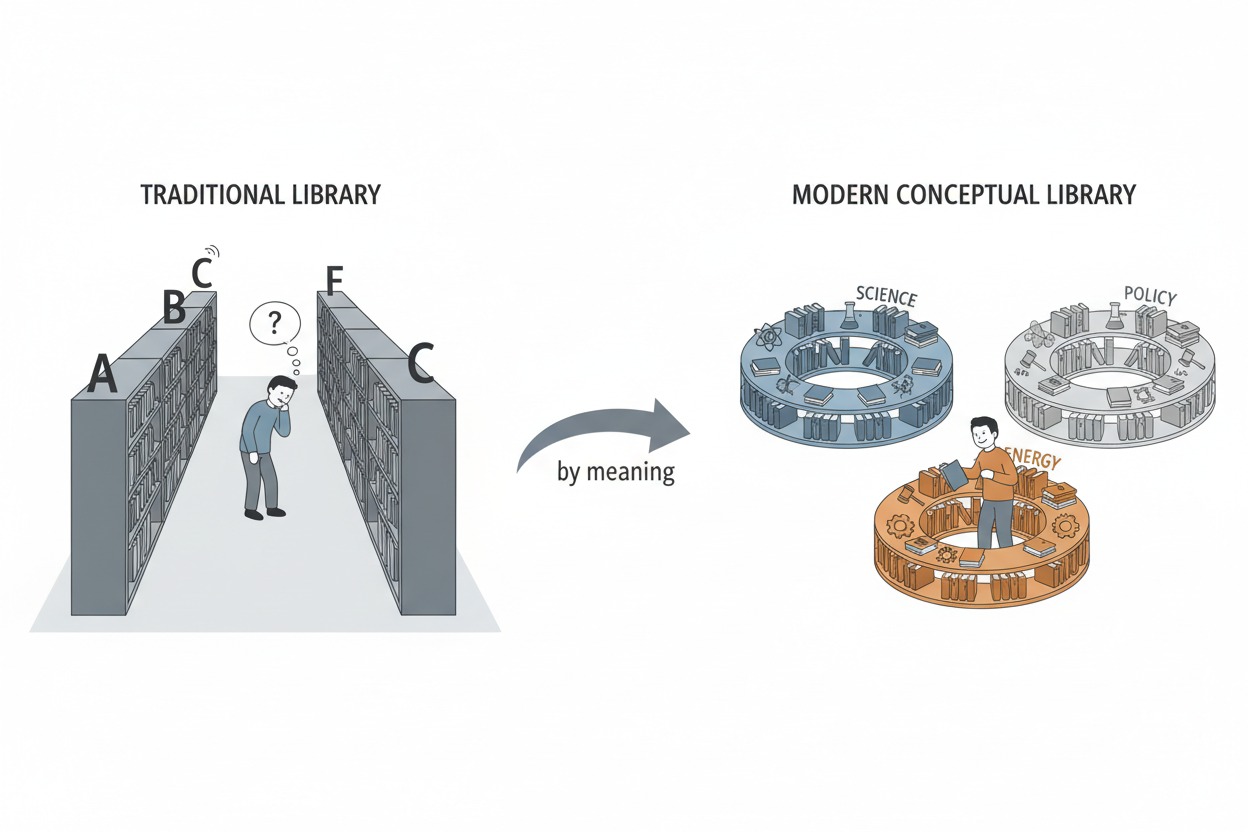
This is like organizing a library not alphabetically or by
publication date, but by topic similarity. Books about related subjects
sit on adjacent shelves. When you need information about a specific
topic, you go straight to the right neighborhood and browse nearby
books. The image below illustrates this contrast: a traditional library
where a reader walks between distant shelves to find related books,
versus a conceptual library where books on science, energy, and policy
are clustered by meaning, putting relevant material within arm’s
reach.
A traditional library with alphabetical
shelves where a reader searches far apart, versus a modern conceptual
library where books on science, energy, and policy are clustered
together by topic.
The entire preparation phase can be summarized in five steps:
Algorithm Sketch: Document Preparation

1. Load document and extract raw text
2. Split text into chunks of ~1000 characters with ~200 character overlap
3. Clean each chunk (remove formatting artifacts)
4. Convert each chunk into an embedding vector
5. Store all vectors in a vector store for fast similarity search
Phase 2: Answering a Query
With the knowledge base prepared, the system is ready to answer
questions. This phase runs every time a user submits a query.
Step 6: Embed the Query
When a user asks a question, that question is converted into an
embedding vector using the exact same process applied to the document
chunks. This is critical: the query must live in the same “meaning
space” as the stored chunks so that distances between them are
meaningful.
Step 7: Find the Nearest Chunks
The system searches the vector store for the chunks whose embedding
vectors are closest to the query vector. A typical setup retrieves the
top 2 to 5 most similar chunks. These represent the parts of the
document most likely to contain the answer.
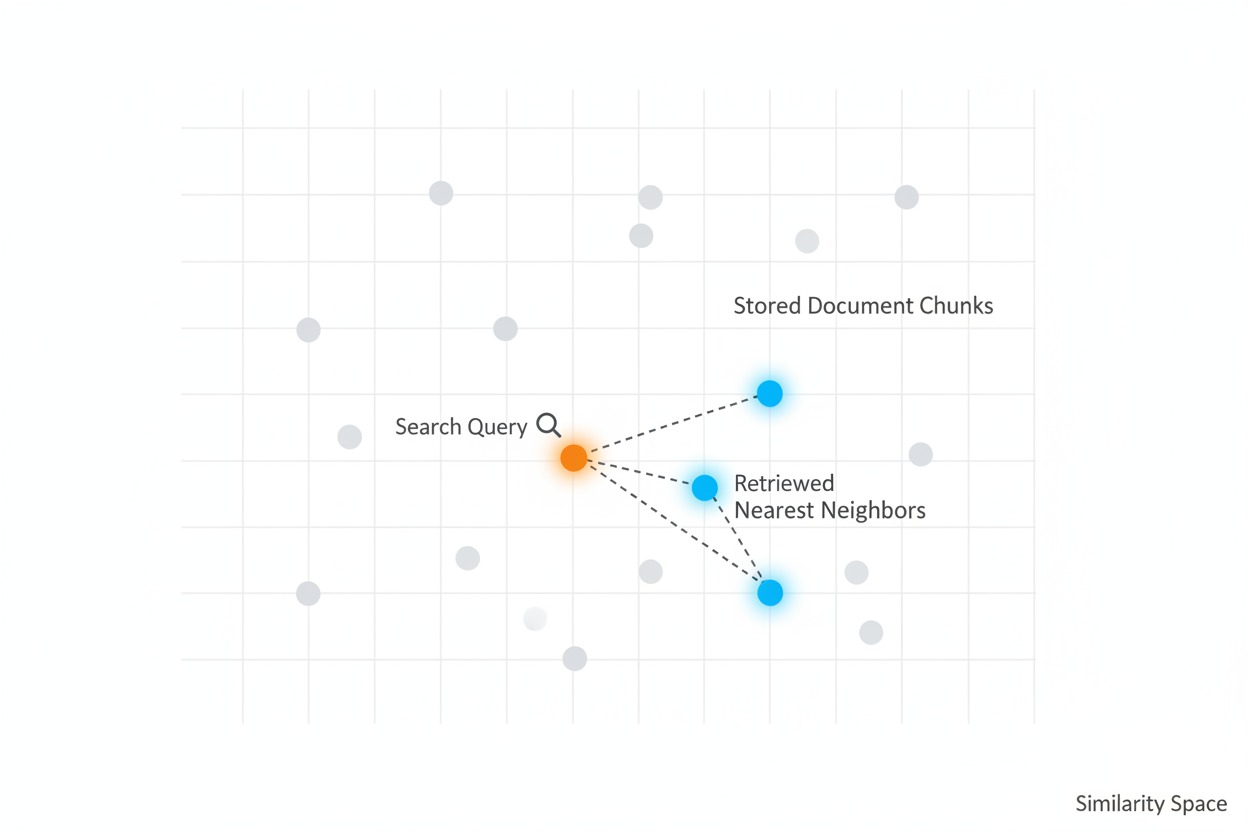
For example, given the query “What is the main cause of climate
change?” against a climate report, the system might retrieve a chunk
discussing greenhouse gases and fossil fuels, and another covering
modern scientific observations about human-driven climate change. Both
are directly relevant to the question. In the diagram below, the orange
dot represents the query in meaning space, and the blue highlighted dots
are the nearest stored chunks that the system retrieves, connected by
dashed lines to show proximity.
A scatter plot of stored document chunks
as gray dots in meaning space. An orange query dot appears with a
magnifying glass, and the three nearest chunks are highlighted in blue
with dashed lines showing their proximity.
Step 8: Generate the Answer
The retrieved chunks are passed to the language model along with the
original question. The model reads the relevant context and generates an
answer that is grounded in the actual document content, not in its
training memory. This is the payoff. The model is no longer guessing. It
is reading the relevant paragraphs and summarizing them for you.
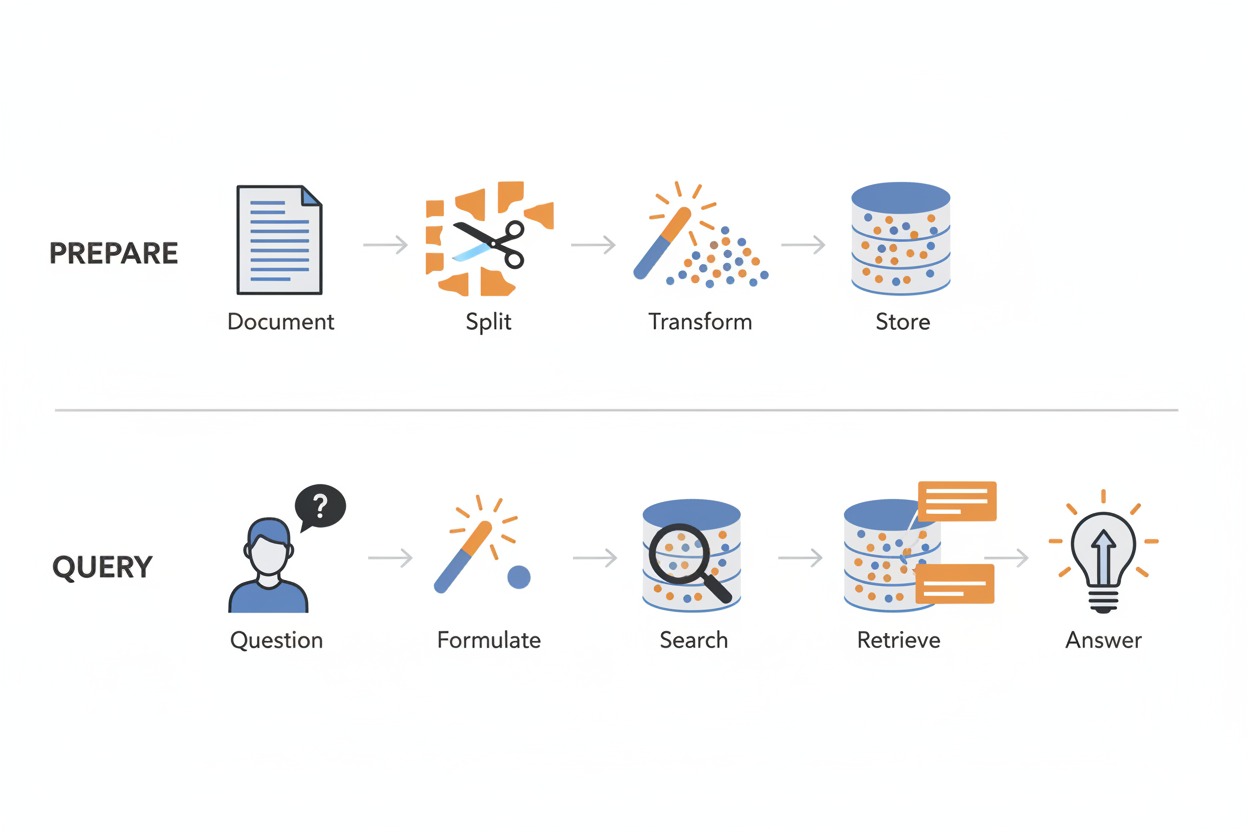
The diagram below shows the complete pipeline end-to-end. The top row
is the preparation phase: a document is split, transformed into vectors,
and stored. The bottom row is the query phase: a question is formulated
into a vector, used to search the database, and the retrieved chunks
feed into the final answer.
The full RAG pipeline in two rows. Top
row labeled “Prepare” shows document, split, transform, store. Bottom
row labeled “Query” shows question, formulate, search, retrieve,
answer.
Algorithm Sketch: Query Processing

1. Receive user question
2. Convert question into an embedding vector
3. Search vector store for top-K nearest chunk vectors
4. Retrieve the corresponding text chunks
5. Pass question + retrieved chunks to the language model
6. Model generates answer grounded in the retrieved context
The Role of Chunk Size
Chunk size is the most important configuration decision in simple
RAG, and there is no single right answer. It is a tradeoff:
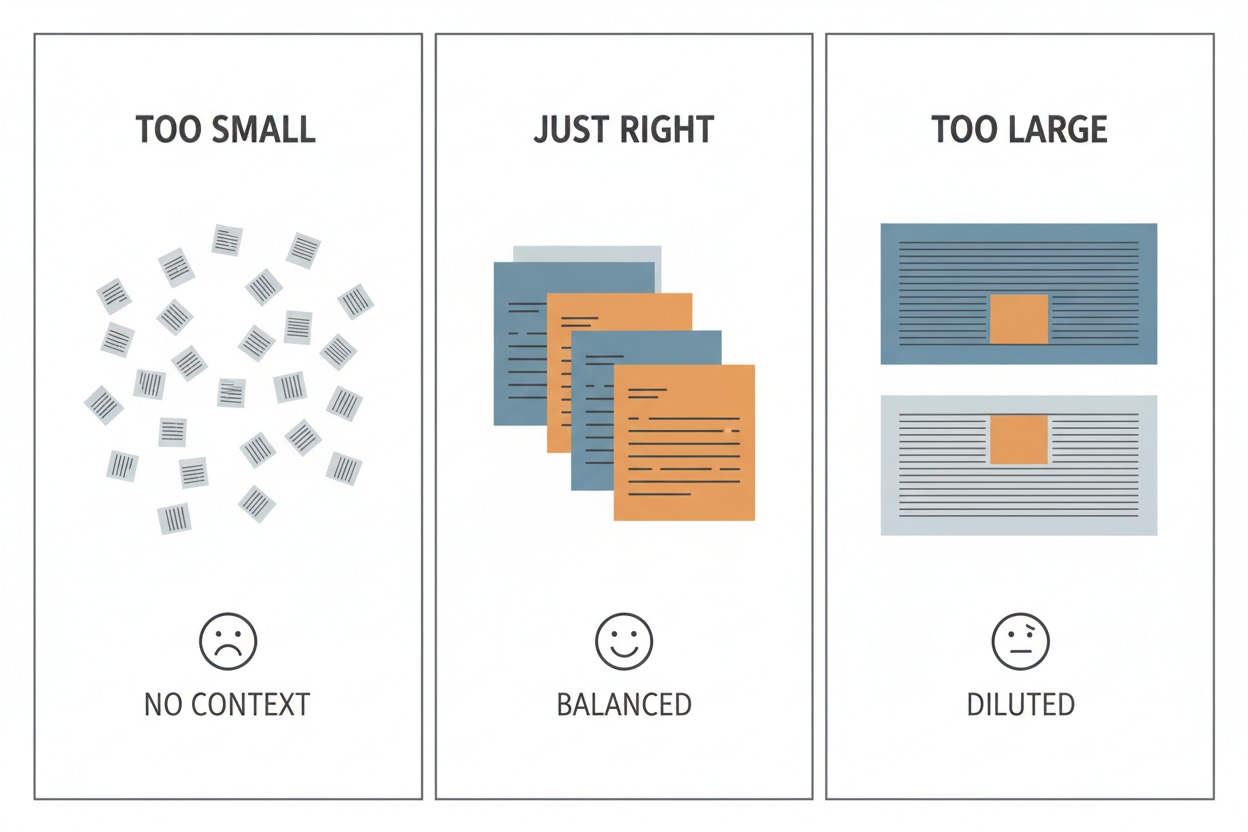
Too small (e.g., 100 characters): Each chunk is just
a sentence or two. It may be very specific, but it lacks surrounding
context. The model gets a precise fragment but cannot understand the
bigger picture.
Too large (e.g., 5,000 characters): Each chunk
covers several pages. The relevant information is buried in a sea of
unrelated text. The retrieval still works, but the signal is diluted by
noise.
Just right (e.g., 1,000 characters with 200
overlap): Each chunk is roughly a full paragraph. It carries enough
context to be meaningful on its own, but is focused enough to rank well
in similarity search. The three panels below show this visually: tiny
scattered fragments with no context, balanced medium-sized pieces, and
oversized blocks where the relevant text is a tiny fraction of the
whole.
Three panels comparing chunk sizes. “Too
Small” shows scattered tiny fragments with no context. “Just Right”
shows balanced medium-sized pieces. “Too Large” shows oversized blocks
where the relevant portion is a tiny highlighted area.
Where Simple RAG Falls Short
Simple RAG handles focused, factual questions well. Ask “What is the
main cause of climate change?” and the system retrieves the right
paragraphs and produces an accurate, grounded answer.
But consider a harder question: “Compare the economic impacts of
climate change across different sectors discussed in the report.” This
requires information scattered across multiple sections of the document.
A system that retrieves only two or three chunks will miss most of the
relevant material. The answer will be incomplete or shallow.
Similarly, questions that require reasoning across multiple concepts,
synthesizing definitions, or connecting ideas from different parts of a
document will expose the limits of retrieving a small, fixed number of
chunks from a single search.
These limitations are not bugs. They are the natural boundaries of
the simplest possible RAG design. They are also exactly what motivate
the advanced techniques covered in later chapters: better chunking
strategies, multi-query retrieval, reranking, and query
transformation.
When to Use This
Best for:
Answering factual questions about a single document or small
collection
Building a quick prototype to validate that RAG helps your use
case
Internal knowledge bases with straightforward lookup queries
Situations where simplicity and low cost matter more than perfect
accuracy
Overkill when:
Your documents are short enough to fit entirely in the model’s
context window
You only need keyword search (traditional search engines work
fine)
You never update your document collection and could pre-compute all
answers
Tradeoffs:
Factor
Impact
Latency
Low: one embedding call + one vector search + one LLM call
Complexity
Low: fewest moving parts of any RAG approach
Cost
Low: embedding is cheap, only one LLM call per query
Accuracy gain
Moderate: strong for focused factual queries, weak for multi-hop or
complex questions
Compared to using an LLM without RAG: Simple RAG
grounds the model’s answers in your actual documents, reducing
hallucination and enabling responses about content the model never saw
during training. The tradeoff is that answer quality depends entirely on
retrieval quality. If the wrong chunks are retrieved, the answer will be
wrong or incomplete. And with a fixed chunk size and a single retrieval
strategy, simple RAG has limited ability to handle nuanced or multi-part
questions.
Key Takeaways
RAG adds a “look it up” step before the language model answers,
grounding responses in actual source material instead of training
memory.
Documents are split into overlapping chunks to ensure no information
is lost at the boundaries between pieces.
Embeddings convert text into numerical vectors where similar
meanings are placed close together, enabling search by meaning rather
than keywords.
A vector store organizes these vectors for fast similarity search,
even across millions of chunks.
Simple RAG is the foundation that all advanced techniques build
upon. Its limitations, including fixed chunk sizes, single-strategy
retrieval, and no query refinement, are exactly what the rest of this
book addresses.
Companion Notebook
The working implementation of this technique is in
simple_rag.ipynb in the RAG Techniques repository.